OhhMuaOhhMua
  • Home
  • WordPress
    • Solutions & Troubleshooting
    • Installation & Setup
    • Themes & Plugins
    • Security
  • Tools
    • veo3 prompt generator
  • Our Team
  • Hosting
    • Best Web Hosting
    • Free Web Hosting
    • VPS Hosting
Reading: What is Obsidian? Why Developers Love This Note-Taking App
Notification Show More
OhhMuaOhhMua
  • WordPress
  • Entry-level Builds
  • High-end Builds
  • Mid-range Builds
  • Hardware Tips
  • Software Tips
Search
  • Home
  • WordPress
    • Installation & Setup
    • Security
    • Solutions & Troubleshooting
    • Themes & Plugins
  • Tools
    • veo3 prompt generator
  • Our Team
    • Hosting
Follow US
Copyright © 2024 ohhmua. All rights reserved.
OhhMua > Blog > WordPress > Solutions & Troubleshooting > What is Obsidian? Why Developers Love This Note-Taking App
Solutions & Troubleshooting

What is Obsidian? Why Developers Love This Note-Taking App

Admin (Nghia Vo)
Last updated: May 20, 2025 3:31 pm
Admin (Nghia Vo)
Share
5 Min Read
What is Obsidian
What is Obsidian
SHARE
Contents
What is Obsidian?Why Do Developers Love Obsidian?1. Write Notes with Markdown2. A Massive Plugin Ecosystem3. Backlinks and the Knowledge Graph4.  Privacy-First: Offline by Default5. Fully Customizable for DevelopersWho is Obsidian For?Must-Have PluginsHow to Install and Use ObsidianStep 1: Download and InstallStep 2: Create a New VaultStep 3: Start Writing NotesStep 4: Install Plugins (Optional but Recommended)Step 5: Use Graph ViewBonus: Sync Across DevicesFinal Thoughts

In today’s tech-driven world, keeping track of knowledge efficiently is more important than ever—especially for developers. That’s where Obsidian comes in.

Unlike cloud-based apps like Notion or Evernote, Obsidian focuses on simplicity, privacy, and linking your thoughts like a second brain. But what exactly is Obsidian, and why is it becoming so popular in the dev community?

What is Obsidian?

Obsidian is a powerful note-taking and personal knowledge management app built on Markdown files.
Everything is stored locally, and you can create interconnected notes, turning your thoughts into a network of knowledge.

Why Do Developers Love Obsidian?

1. Write Notes with Markdown

Obsidian uses plain Markdown syntax, which is clean, fast, and dev-friendly.

## Example Header
- Bullet list
- TODO tasks
- `Inline code snippet`

Your notes are stored as .md files—lightweight and portable.

2. A Massive Plugin Ecosystem

Obsidian offers a wide array of plugins that turn it into more than just a note app:

  • ✅ To-Do lists, daily journals

  • ✅ Kanban boards for task management

  • ✅ Code snippet manager

  • ✅ Mind maps

  • ✅ Flashcard-based learning

You can also create your own plugins using JavaScript!

3. Backlinks and the Knowledge Graph

Obsidian lets you connect your notes just like Wikipedia does. With backlinks and graph view, you’ll see how your ideas relate to one another.

Great for:

  • Documenting projects

  • Linking tutorials to code snippets

  • Building a personal learning network

4.  Privacy-First: Offline by Default

Unlike cloud tools, Obsidian works offline and doesn’t store your data on any external servers.

  • All files are on your device

  • No mandatory sign-in

  • Full control over your knowledge base

Perfect for privacy-conscious users.

5. Fully Customizable for Developers

  • Custom CSS themes

  • Git integration for version control

  • Supports LaTeX (great for devs in AI, math, science)

  • JavaScript plugin API

If you love tweaking and customizing tools to your workflow, you’ll love Obsidian.

Who is Obsidian For?

Obsidian is ideal for:

  • 🧑‍💻 Backend/Frontend Developers managing project notes

  • ✍️ Tech bloggers outlining content

  • 🎓 CS students organizing lectures and concepts

  • 🧠 Self-learners building their second brain

Must-Have Plugins

Plugin Name Description
Calendar Daily journaling made easy
Kanban Task tracking like Trello
Advanced Tables Better table creation
Quick Switcher++ Jump between notes instantly
Dataview Make notes behave like a database
Templater Auto-generate note templates

How to Install and Use Obsidian

Step 1: Download and Install

  1. Go to the official site:
    👉 https://obsidian.md

  2. Click “Download” for your operating system:

    • Windows (.exe)

    • macOS (.dmg)

    • Linux (AppImage / Snap / Flatpak)

  3. Install the application just like any other software.

✅ Obsidian is free for personal use.

Step 2: Create a New Vault

A Vault is your personal workspace that holds all your notes.

  • Open Obsidian → Click “Create a new vault”
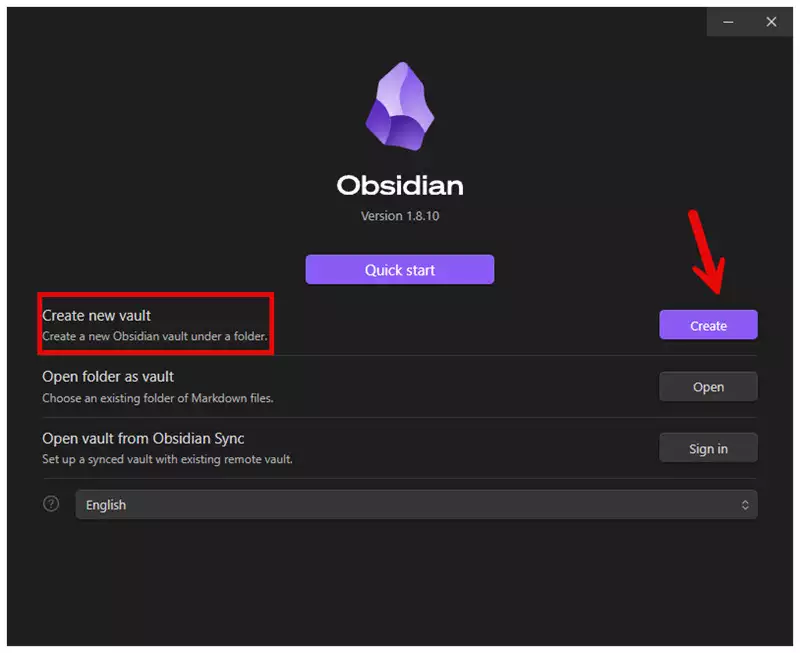
    obsidian create new vault
    obsidian create new vault


  • Choose a name (e.g., “Dev Notes”, “Personal Wiki”)
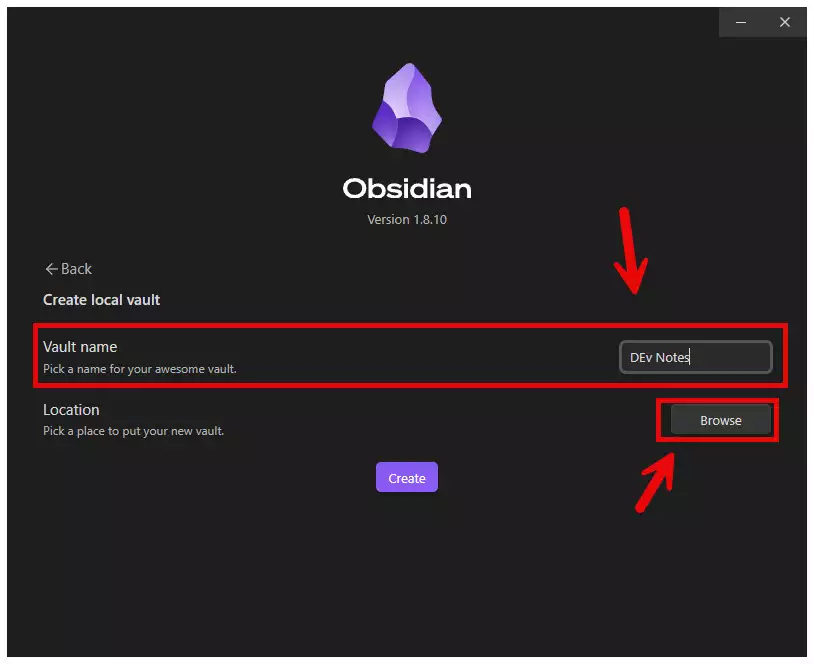
    vault name obsidian
    vault name obsidian
  • Select the folder where your .md files will be stored

Step 3: Start Writing Notes

  • Click “+ New note” to create a new file
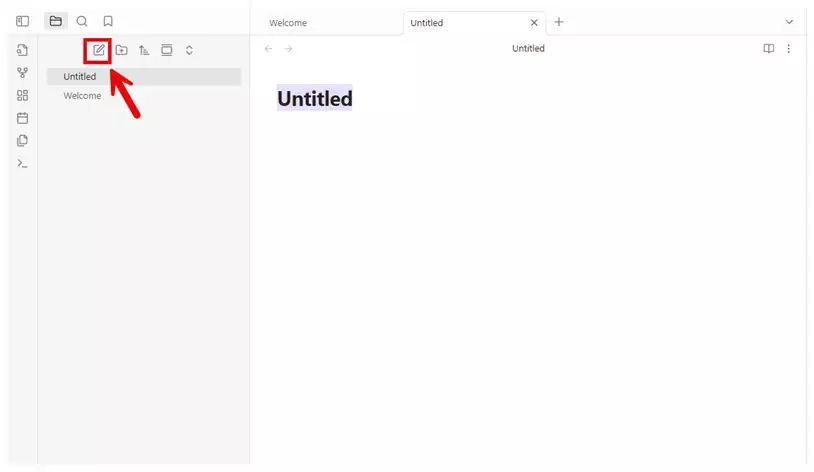
    new notes obsidian
    new notes obsidian
  • Start typing using Markdown syntax

  • Use [[Double Brackets]] to link notes

  • Use #tags to categorize topics

Step 4: Install Plugins (Optional but Recommended)

To enable community plugins:

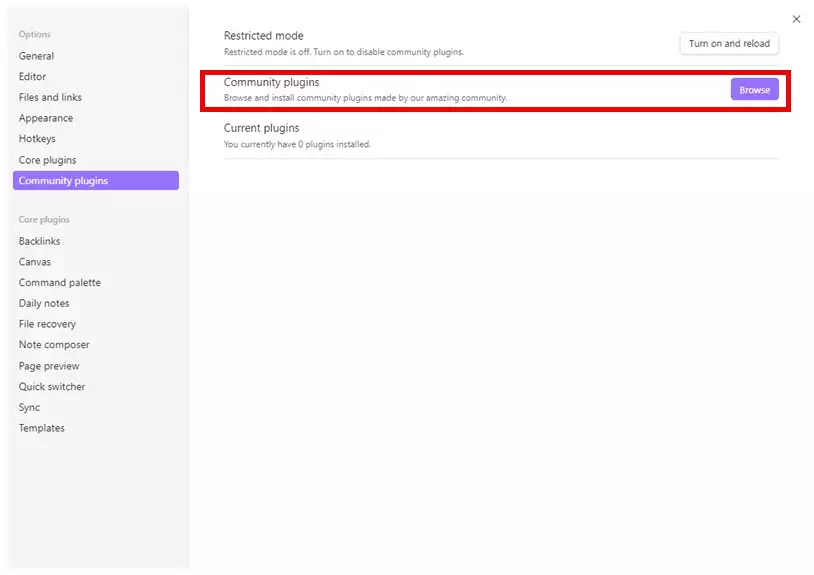
  1. Go to Settings → Community Plugins

    community plugins obsidian
    community plugins obsidian


  2. Toggle “Safe Mode” OFF

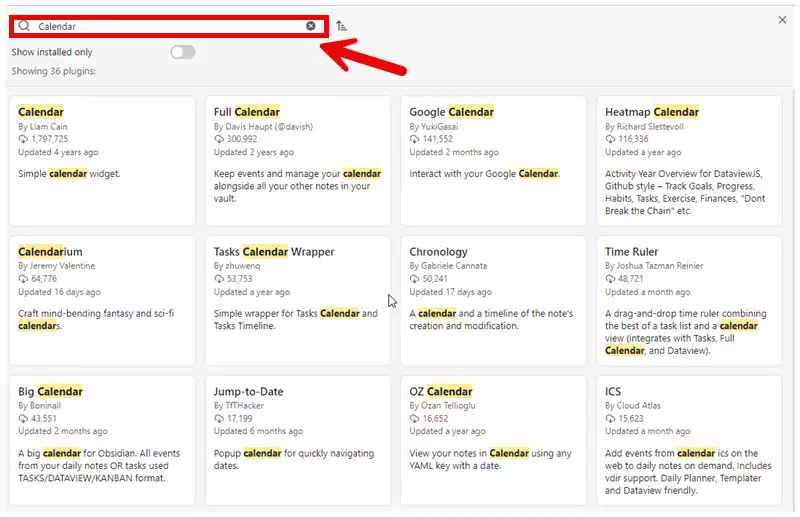
  3. Click “Browse” and search for plugins like:
    install plugins obsidian
    install plugins obsidian
    • Calendar

    • Kanban

    • Templater

    • Dataview

⚠️ Some plugins are community-maintained, so install carefully.

Step 5: Use Graph View

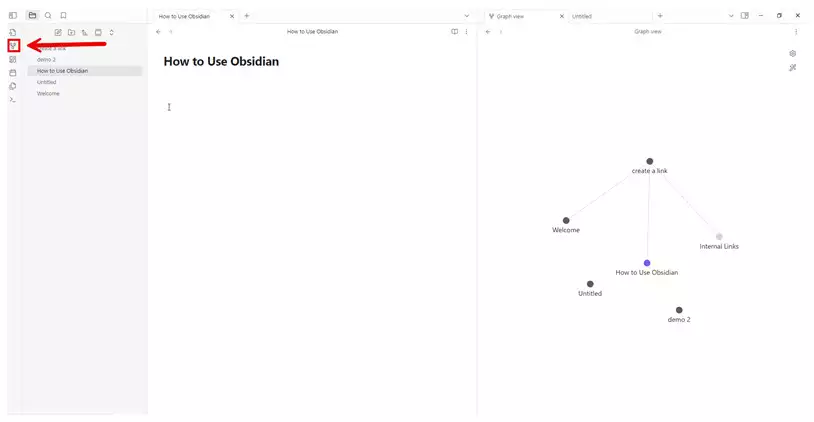
Click the “Graph” icon on the left sidebar to visualize how your notes are connected.

This is what turns Obsidian into a “second brain”—seeing relationships between ideas over time.
open graph obsidian
open graph obsidian

Bonus: Sync Across Devices

While Obsidian is offline-first, you can sync your notes:

  • Using Obsidian Sync (paid)

  • Or manually via Dropbox, iCloud, Git, or Syncthing

For example, many devs keep their Obsidian vault in a GitHub repo for versioning

Final Thoughts

Obsidian is not just a note-taking app—it’s a tool for building your personal knowledge system.

With its offline-first approach, plugin extensibility, and Markdown simplicity, it offers a developer-centric experience that’s hard to beat.

480520387 657957633334779 6814038772835954285 n
Admin (Nghia Vo)

Hi, I’m Nghia Vo: a computer hardware graduate, passionate PC hardware blogger, and entrepreneur with extensive hands-on experience building and upgrading computers for gaming, productivity, and business operations.
As the founder of Vonebuy.com, a verified ecommerce store under Vietnam’s Ministry of Industry and Trade, I combine my technical knowledge with real-world business applications to help users make confident decisions.

I specialize in no-nonsense guides on RAM overclocking, motherboard compatibility, SSD upgrades, and honest product reviews sharing everything I’ve tested and implemented for my customers and readers.

You Might Also Like

Headless vs Traditional WooCommerce: Which Architecture Wins?

Can AI Agents Safely Access Your WordPress Site?

Is WordPress Dead or Still Powering the Web in 2026?

WordPress 6.9.2 Disaster: Why You Should Never Auto-Update Immediately

Headless WordPress Explained: Is It Right for Your Site?

Share This Article
Facebook Twitter Email Print
By Admin (Nghia Vo)
Follow:
Hi, I’m Nghia Vo: a computer hardware graduate, passionate PC hardware blogger, and entrepreneur with extensive hands-on experience building and upgrading computers for gaming, productivity, and business operations. As the founder of Vonebuy.com, a verified ecommerce store under Vietnam's Ministry of Industry and Trade, I combine my technical knowledge with real-world business applications to help users make confident decisions. I specialize in no-nonsense guides on RAM overclocking, motherboard compatibility, SSD upgrades, and honest product reviews sharing everything I’ve tested and implemented for my customers and readers.

Leave a comment Leave a comment

Leave a Reply Cancel reply

Your email address will not be published. Required fields are marked *

Trending

Headless WordPress Explained
Solutions & Troubleshooting

Headless WordPress Explained: Is It Right for Your Site?

March 10, 2026
wordpress 6.9.2 disaster
Solutions & Troubleshooting

WordPress 6.9.2 Disaster: Why You Should Never Auto-Update Immediately

March 11, 2026
Internet Connected But Can't Access Some Websites
Software Tips

Internet Connected But Can’t Access Some Websites: Causes and Fixes

September 25, 2020
How to Add a Read More to Product Descriptions in WooCommerce
Solutions & Troubleshooting

How to Add a “Read More” and “Show Less” Button to Product Descriptions in WooCommerce

May 5, 2025
wordpress speed 2026
Solutions & Troubleshooting

WordPress Speed in 2026: The Only Hosting Checklist You Need

March 7, 2026
headless vs traditional woocommerce site
Solutions & Troubleshooting

Headless vs Traditional WooCommerce: Which Architecture Wins?

March 19, 2026
Previous Next

You Might Also Like

WordPress 7.0 Finally Fixes 20 Years of Painful Collaboration Problems
Solutions & Troubleshooting

WordPress 7.0 Finally Fixes 20 Years of Painful Collaboration Problems

Admin (Nghia Vo) Admin (Nghia Vo) March 9, 2026
HETZNER HOSTING
Solutions & Troubleshooting

Why Hetzner Might Not Be the Right Choice for Beginners

Admin (Nghia Vo) Admin (Nghia Vo) March 7, 2026
What Happens When Web Hosting Companies Get Acquired
Solutions & Troubleshooting

What Happens When Web Hosting Companies Get Acquired

Admin (Nghia Vo) Admin (Nghia Vo) March 6, 2026
wordpress shortcode 1
Solutions & Troubleshooting

WordPress Shortcodes: Complete Guide to Dynamic Content

Admin (Nghia Vo) Admin (Nghia Vo) March 4, 2026
How to Make Google Understand and Value Your Content
Solutions & Troubleshooting

SEO in the Age of AI: How to Make Google Understand and Value Your Content

Admin (Nghia Vo) Admin (Nghia Vo) June 5, 2025
Cannot Fetch Sitemap in Google Search Console
Solutions & Troubleshooting

Cannot Fetch Sitemap in Google Search Console

Admin (Nghia Vo) Admin (Nghia Vo) May 27, 2025
Previous Next
newsletter featured

Always Stay Up to Date

Subscribe to our newsletter to get our newest articles instantly!

Follow US on Social Media

Facebook Youtube Steam Twitch Unity

Copyright © 2024 ohhmua. All rights reserved.

OhhMua

Information

  • About
  • Terms & Conditions
  • Privacy Policy
  • Editorial Standards
Welcome Back!

Sign in to your account

Lost your password?