
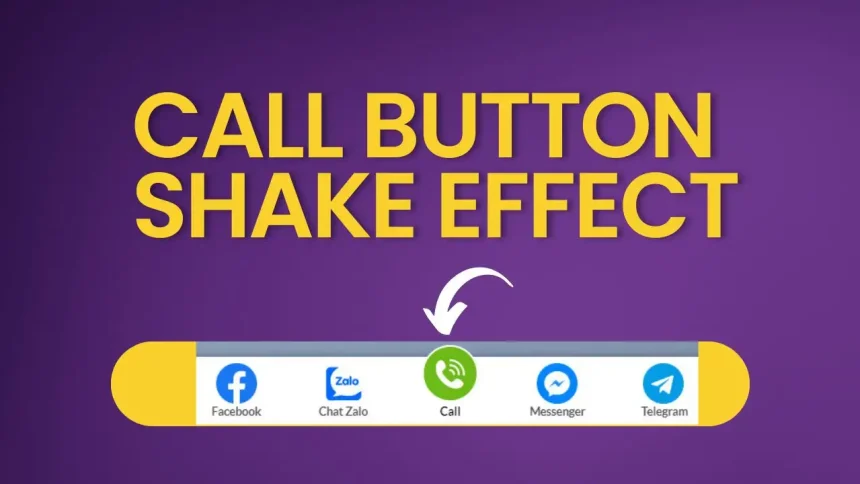
To improve user engagement and draw attention to your contact section, implementing a subtle shake animation on the call button in the footer can be an effective strategy. This dynamic effect not only makes the button more visually appealing but also enhances the overall user experience by highlighting the call-to-action in a professional and engaging way.

Advantages of the contact button code:
- It only includes HTML and CSS, so if you have deferred JavaScript loading or delayed JavaScript, it won’t be affected. The button will be immediately available for user interaction. Just make sure to exclude the icon images from lazy loading.
- It can be customized to your preference.
- The contact button in the footer has an added shake effect for the call button.
Reminder: Don’t forget to replace the icons with those from your own website.
The theme used in the example is the Flatsome theme, but you can use any other theme of your choice. Just make sure to insert the correct code into the footer scripts.
<style>

@keyframes ring {
    0% { transform: rotate(0deg); }
    10% { transform: rotate(15deg); }
    20% { transform: rotate(-10deg); }
    30% { transform: rotate(15deg); }
    40% { transform: rotate(-10deg); }
    50% { transform: rotate(5deg); }
    60% { transform: rotate(-5deg); }
    70% { transform: rotate(0deg); }
    100% { transform: rotate(0deg); }
}

.icon-phone-w {
    animation: ring 1.5s ease-in-out infinite;
    background-size: contain;
}
.phone-mobile {display: none;}
.webantam-nav {
    position: fixed;
    right: 13px;
    background: #fff;
    border-radius: 5px;
    width: auto;
    z-index: 150;
    bottom: 70px;
    padding: 10px 0;
    border: 1px solid #f2f2f2;
}
.webantam-nav ul {list-style: none;padding: 0;margin: 0;}
.webantam-nav ul li {list-style: none!important;}
.webantam-nav ul>li a {
    border:none;
    padding: 3px;
    display: block;
    border-radius: 5px;
    text-align: center;
    font-size: 10px;
    line-height: 15px;
    color: #515151;
    font-weight: 700;
    max-width: 72.19px;
    max-height: 54px;
    text-decoration: none;
}
.webantam-nav ul>li .chat_animation{display:none}
.webantam-nav ul>li a i.ticon-heart {
    background: url(https://webantam.com/wp-content/uploads/2024/08/facebook.png) no-repeat;
    background-size: contain;
    width: 36px;
    height: 36px;
    display: block;
}
.webantam-nav ul>li a i.ticon-zalo-circle2 {
    background: url(https://webantam.com/wp-content/uploads/2024/08/widget_icon_light_zalo.svg) no-repeat;
    background-size: contain;
    width: 36px;
    height: 36px;
    display: block;
}.webantam-nav li .button {
    background: transparent;
    box-shadow: none !important;

}.webantam-nav ul>li a i {
    width: 33px;
    height: 33px;
    display: block;
    margin: auto;
}.webantam-nav ul li .button .btn_phone_txt {
    position: relative; top:35px;
    font-size: 10px;
    font-weight: bold;
    text-transform: none;
}
.webantam-nav ul li .button .phone_animation i {
    display: inline-block;
    width: 27px;
    font-size: 26px;
    margin-top: 12px;
}.webantam-nav ul>li a.chat_animation svg {
    margin: -13px 0 -20px;
}
.webantam-nav ul>li a i.ticon-messenger {
    background: url(https://webantam.com/wp-content/uploads/2024/08/messenger.png) no-repeat;
    background-size: contain;
    width: 36px;
    height: 36px;
    display: block;
}.webantam-nav ul li .button .phone_animation i {
    display: inline-block;
    width: 27px;
    font-size: 26px;
    margin-top: 12px;
}
.webantam-nav ul>li a i.ticon-chat-telegram {
    background: url(https://webantam.com/wp-content/uploads/2024/08/telegram.png) no-repeat;
    background-size: contain;
    width: 38px;
    height: 36px;
    display: block;
}
.webantam-nav ul>li a i.icon-phone-w {
    background: url(https://webantam.com/wp-content/uploads/2024/08/phone.png) no-repeat;
    background-size: contain;}
.webantam-nav ul li .button .btn_phone_txt {
    position: relative;
    color: black;
}
@media only screen and (max-width: 600px){
.webantam-nav li .chat_animation{display:block !Important}

.webantam-nav li .button .phone_animation {box-shadow: none;
    position: absolute;
    top: -16px;
    left: 50%;
    transform: translate(-50%,0);
    width: 50px;
    height: 50px;
    border-radius: 100%;
    background: #6cb917;
    line-height: 15px;
    border: 2px solid white;
}
.webantam-nav ul>li a{padding:0; margin:0 auto}
.webantam-nav {
    background: white;
    width: 100%; border-radius:0;
    color: #fff;
    height: 60px;
    line-height: 50px;
    position: fixed;
    bottom: 0;
    left: 0;
    z-index: 999;
    padding: 5px;
    margin: 0;
    box-shadow: 0 4px 10px 0 #000;
}
.webantam-nav li {
    float: left;
    width: 20%;
    list-style: none;
    height: 50px;
}
.phone-mobile{display:block !important}}
</style>
<div class="webantam-nav">
        <ul>
            <li><a href="https://www.facebook.com/webantam43/" rel="nofollow" target="_blank"><i class="ticon-heart"></i>Facebook</a></li>
            <li><a href="https://zalo.me/0918869237" rel="nofollow" target="_blank"><i class="ticon-zalo-circle2"></i>Chat Zalo</a></li>
                        <li class="phone-mobile">
                            <a href="tel:0918869237" rel="nofollow" class="button">
                                <span class="phone_animation animation-shadow">
                                    <i class="icon-phone-w" aria-hidden="true"></i>
                                </span>
                                <span class="btn_phone_txt">Call</span>
                            </a>
                        </li>
                        <li><a href="https://www.messenger.com/t/webantam43/" rel="nofollow" target="_blank"><i class="ticon-messenger"></i>Messenger</a></li>
            <li><a href="https://t.me/webantam/" rel="nofollow" target="_blank">
            <i class="ticon-chat-telegram" aria-hidden="true" title="Telegram"></i>
                Telegram</a>
            </li>

        </ul>
    </div>
Hi, I’m Nghia Vo: a computer hardware graduate, passionate PC hardware blogger, and entrepreneur with extensive hands-on experience building and upgrading computers for gaming, productivity, and business operations.
As the founder of Vonebuy.com, a verified ecommerce store under Vietnam’s Ministry of Industry and Trade, I combine my technical knowledge with real-world business applications to help users make confident decisions.
I specialize in no-nonsense guides on RAM overclocking, motherboard compatibility, SSD upgrades, and honest product reviews sharing everything I’ve tested and implemented for my customers and readers.