

When building a website, pagination is an essential element, especially for category pages, blogs, or online stores with a large amount of content. However, if pagination is not handled properly, your website can easily suffer from SEO issues, duplicate content, and poor indexing by Google.
In this article, I’ll share the best practices for handling pagination for SEO in 2025, based on the latest standards and hands-on experience.
1. How Pagination Affects SEO
If pagination isn’t optimized, you might face problems like:
-
Google indexing
/page/2,/page/3, etc., causing thin content or duplicate content. -
Link juice being spread too thin, reducing the SEO strength of your main pages.
-
Poor user experience (UX) if pagination is broken or not user-friendly.
That’s why Google and SEO experts highly recommend having a solid pagination strategy in 2025.
2. Best Practices for Handling Pagination in 2025
A. Add Noindex to Pagination Pages
-
Pages like
/page/2/,/page/3/should have the meta tag<meta name="robots" content="noindex,follow">. -
Purpose: Prevent Google from indexing pagination pages but still allow it to crawl the links within those pages.
-
This is the safest way to avoid duplicate content and content dilution issues.
✅ Correct example:
<meta name="robots" content="noindex,follow">B. Optimize rel=”next” and rel=”prev” (if used)
-
Previously, Google used rel=”next” and rel=”prev” to understand paginated series, but since 2020, Google no longer officially supports these attributes.
-
However, using rel=”next/prev” can still be beneficial for user agents and other search engines like Bing.
-
If you choose to implement it, make sure it’s done correctly.
✅ Example:
<link rel="prev" href="https://ohhmua.com/computer-hardware/">
<link rel="next" href="https://ohhmua.com/computer-hardware/page/3/">
Scroll to the bottom of the functions.php file and paste this code:
// Add rel="next" and rel="prev" for paginated pages
add_action('wp_head', function() {
    if (is_paged() && !is_singular() && (is_archive() || is_home() || is_search())) {
        global $paged, $wp_query;
        $paged = max(1, get_query_var('paged'));
        $nextpage = $paged + 1;
        $prevpage = $paged - 1;
        $max_page = $wp_query->max_num_pages;

        if ($prevpage > 0) {
            echo '<link rel="prev" href="' . get_pagenum_link($prevpage) . '" />' . "\n";
        }
        if ($nextpage <= $max_page) {
            echo '<link rel="next" href="' . get_pagenum_link($nextpage) . '" />' . "\n";
        }
    }
});

// Add noindex, follow to paginated pages
add_action('wp_head', function() {
    if (is_paged() && !is_singular() && (is_archive() || is_home() || is_search())) {
        echo '<meta name="robots" content="noindex,follow">' . "\n";
    }
});
Save the Changes
After adding the code, click the Update File button to save.
Verify the Implementation
-
Open a paginated page on your website (for example:
https://yourdomain.com/category/page/2/). -
Right-click on the page and select View Page Source.
-
Check inside the
<head>section:-
You should see the
<link rel="prev">and<link rel="next">tags. -
You should also see
<meta name="robots" content="noindex,follow">.
-
<link rel="prev" href="https://yourdomain.com/category/" />
<link rel="next" href="https://yourdomain.com/category/page/3/" />
<meta name="robots" content="noindex,follow">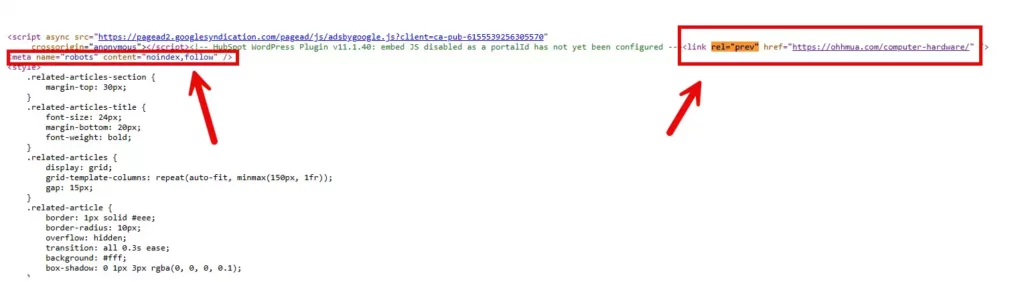
Don’t want to deal with coding?
Just install the Pagination SEO Optimizer plugin!
-
✅ Automatically adds
<link rel="next">and<link rel="prev">to the<head>. -
✅ Automatically inserts
<meta name="robots" content="noindex,follow">on paginated pages (/page/2/,/page/3/, etc.). -
✅ No setup required — simply upload, activate, and it works right away!
C. Alternative Solution: Load More Button or Infinite Scroll
-
A growing trend in 2025 is replacing traditional pagination with a Load More button or infinite scroll.
-
If you opt for Load More or Infinite Scroll:
-
Ensure real HTML links are available for search engines (not just JavaScript rendering).
-
Have a complete sitemap containing all post URLs.
-
Make sure content is accessible even when JavaScript is disabled, so Googlebot can crawl everything.
-
❗ Poor implementation of Infinite Scroll can result in Googlebot missing your content.
3. Summary: How to Optimize Pagination for SEO in 2025
| Criteria | Best Practice |
|---|---|
/page/2, /page/3 Pages |
Set to Noindex, Follow |
| rel=”next” and rel=”prev” Links | Optional, but helpful |
| Load More or Infinite Scroll | Must ensure full crawlability |
| XML Sitemap | Include all old and new posts |
4. How to Verify After Optimization
-
Use Google Search Console and the “URL Inspection” tool to check if
/page/2/,/page/3/pages are properly marked as “Noindex”. -
Test with incognito browsing or SEO tools like Screaming Frog to audit your site.
-
Monitor your indexing status and organic traffic after making the adjustments.
Conclusion
Handling pagination correctly in 2025 not only helps you avoid SEO penalties but also improves user experience significantly. Whether you choose noindex, rel next/prev, or Load More, ensure Google can access and understand your content structure properly.

Hi, I’m Nghia Vo: a computer hardware graduate, passionate PC hardware blogger, and entrepreneur with extensive hands-on experience building and upgrading computers for gaming, productivity, and business operations.
As the founder of Vonebuy.com, a verified ecommerce store under Vietnam’s Ministry of Industry and Trade, I combine my technical knowledge with real-world business applications to help users make confident decisions.
I specialize in no-nonsense guides on RAM overclocking, motherboard compatibility, SSD upgrades, and honest product reviews sharing everything I’ve tested and implemented for my customers and readers.